Paying your electricity bill has never been easier thanks to the KPLC postpaid Paybill service. Whether you’re paying from home, at work, or while traveling, M-Pesa allows you to settle your Kenya Power bill in just a few minutes without visiting a customer service office.
This guide explains everything you need to know about the KPLC Paybill number, how to pay your bill via M-Pesa, common payment mistakes to avoid, transaction limits, payment confirmation, and troubleshooting tips. By the end, you’ll know exactly how to complete a successful payment every time.

What Is the KPLC Postpaid Paybill?
The KPLC postpaid Paybill is a payment service that allows customers to pay their monthly electricity bills through Safaricom M-Pesa.
A postpaid electricity account means you use electricity first and receive a bill later based on your monthly consumption. Instead of purchasing tokens, you pay an invoice after using the service.
Unlike prepaid customers who buy electricity tokens before consumption, postpaid customers receive a monthly statement showing:
- Previous balance
- Current electricity usage
- Meter readings
- Taxes and levies
- Total amount due
- Payment deadline
Using M-Pesa simplifies the process by allowing payments anytime, including weekends and public holidays.
KPLC Paybill Number for Postpaid Customers
If you’re wondering about the official KPLC Paybill number, here’s the information you need.
| Payment Detail | Information |
|---|---|
| Paybill Number | 888888 |
| Business Name | Kenya Power |
| Account Number | Your KPLC Postpaid Account Number |
| Minimum Payment | Subject to your outstanding bill |
| Payment Method | M-Pesa Paybill |
Your account number is the most important detail during payment. Entering the wrong account number may delay your payment or require additional assistance from Kenya Power customer support.
How to Pay KPLC Bill via M-Pesa
Paying your bill only takes a few minutes if you follow the correct steps.
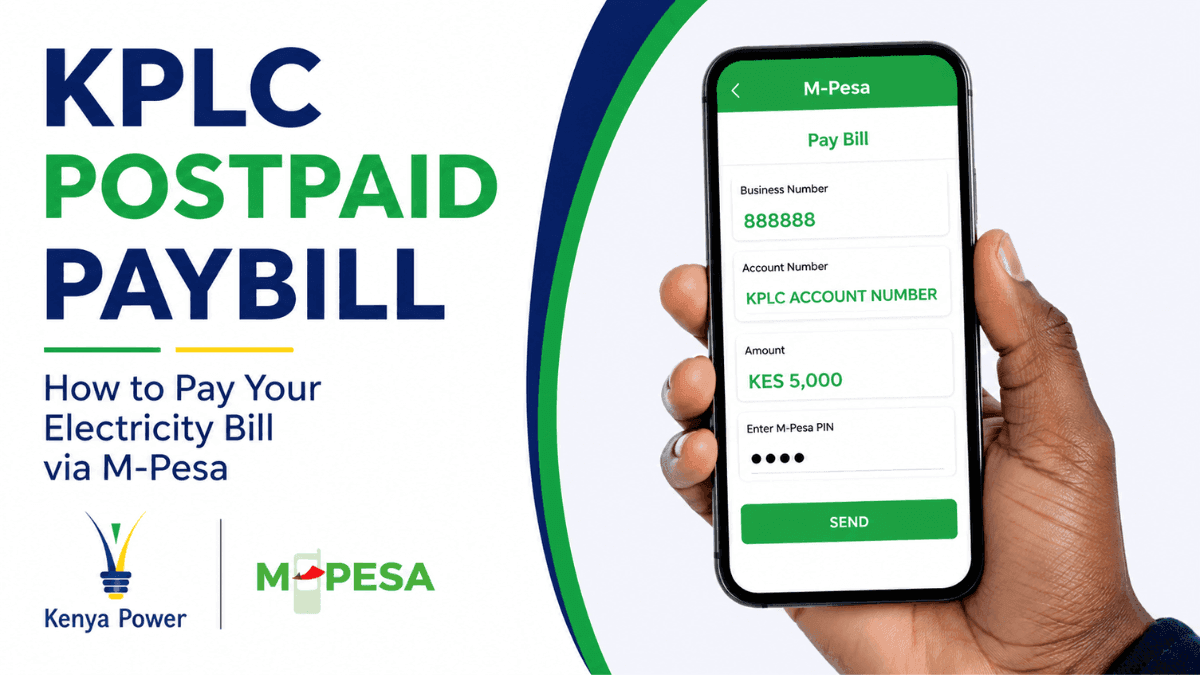
Step 1: Open M-Pesa Menu
Open your Safaricom SIM Toolkit or use the M-Pesa app.
Select:
M-Pesa → Lipa na M-Pesa → Pay Bill
Step 2: Enter the Business Number
Enter:
888888
Double-check the number before proceeding.
Step 3: Enter Your KPLC Account Number
Input your postpaid account number exactly as it appears on your electricity bill.
Avoid adding spaces or unnecessary characters.
Step 4: Enter the Amount
Type the amount you wish to pay.
Most customers choose to pay the full outstanding balance, although partial payments may be accepted depending on your account status.
Step 5: Enter Your M-Pesa PIN
Review all payment details carefully.
If everything looks correct, enter your M-Pesa PIN to authorize the transaction.
Step 6: Wait for Confirmation
You’ll receive:
- An M-Pesa confirmation SMS
- A Kenya Power payment confirmation (in most cases)
Keep these messages until your payment reflects on your account.
Information You’ll Need Before Paying
Before making a payment, ensure you have the correct details ready.
You’ll need:
- KPLC Paybill Number (888888)
- Your postpaid account number
- Enough money in your M-Pesa wallet
- Your M-Pesa PIN
Taking a few extra seconds to verify these details can prevent payment errors.
Where Can You Find Your KPLC Account Number?
Many customers confuse their meter number with their account number.
Your account number can usually be found on:
- Your monthly electricity bill
- Previous payment receipts
- Kenya Power SMS notifications
- Kenya Power customer portal
- Customer care assistance
Always use the account number—not the meter number—when making a postpaid payment unless instructed otherwise.
How Long Does Payment Take to Reflect?
Most KPLC post pay Paybill transactions are processed almost instantly.
In many cases, your payment appears within a few minutes. During periods of high system traffic or scheduled maintenance, it may take several hours before the payment reflects in your account.
If your payment hasn’t appeared after 24 hours, contact Kenya Power customer support and provide your M-Pesa transaction reference.
Common Mistakes to Avoid When Paying
Small mistakes can cause unnecessary delays or failed payments.
Here are some of the most common errors:
- Entering the wrong account number
- Using an incorrect Paybill number
- Paying the wrong amount
- Confirming payment without reviewing details
- Deleting the confirmation SMS before the payment reflects
Carefully reviewing your information before submitting the payment helps prevent these issues.
What Happens If You Enter the Wrong Account Number?
Mistakes happen, especially when typing long account numbers.
If you’ve sent money to the correct Paybill but used the wrong account number:
- Do not send another payment immediately.
- Keep your M-Pesa confirmation message.
- Contact Kenya Power customer care as soon as possible.
- Provide your transaction reference, payment amount, date, and the correct account number.
The sooner you report the issue, the easier it is to investigate and resolve.
Can You Pay Part of Your Electricity Bill?
Many customers ask whether partial payments are allowed.
In most cases, Kenya Power accepts partial payments toward outstanding balances. However, paying less than the billed amount does not necessarily prevent reminders, penalties, or possible disconnection if the account remains overdue.
Paying the full balance before the due date is usually the safest approach.
What Are the Benefits of Paying KPLC Bills via M-Pesa?
Using M-Pesa offers several practical advantages over traditional payment methods.
These include:
- Fast and convenient payments
- Available 24 hours a day
- No need to queue at payment offices
- Instant payment confirmation
- Secure mobile transactions
- Easy record keeping through SMS receipts
- Accessible from almost anywhere in Kenya
These benefits have made M-Pesa the preferred payment option for millions of Kenya Power customers.
M-Pesa Transaction Limits
Your payment must comply with Safaricom’s current M-Pesa transaction limits.
If your electricity bill exceeds the maximum allowed amount for a single transaction, you may need to:
- Split the payment into multiple transactions (where permitted)
- Use alternative payment methods
- Visit your bank if necessary
Transaction limits are reviewed from time to time, so it’s always a good idea to confirm the latest limits before making unusually large payments.
What Should You Do If Your Payment Doesn’t Reflect?
Occasionally, delays can occur due to network issues or system maintenance.
Before raising a complaint:
- Wait at least a few hours.
- Confirm you entered the correct account number.
- Check that M-Pesa shows a successful transaction.
- Keep your confirmation message.
If the payment still hasn’t reflected after 24 hours, contact Kenya Power customer support with:
- M-Pesa transaction code
- Payment amount
- Date and time
- Account number
- Your contact information
Having these details ready speeds up the verification process.
Can You Pay Using the M-Pesa App Instead of the SIM Toolkit?
Yes. The M-Pesa app supports the same Paybill payment process.
The steps are nearly identical:
- Open the app.
- Select Pay Bill.
- Enter 888888.
- Provide your account number.
- Enter the payment amount.
- Confirm using your secure authentication method.
Some users find the app easier because it provides a cleaner interface and payment history.
Is Paying Through the KPLC Postpaid Paybill Safe?
Yes, provided you follow basic security practices.
Never share your M-Pesa PIN with anyone, even if they claim to work for Kenya Power or Safaricom. Genuine customer service representatives will never ask for your PIN.
You should also:
- Verify the Paybill number before paying.
- Avoid making payments on public Wi-Fi if using the M-Pesa app.
- Save your payment confirmations until the transaction is reflected.
- Report suspicious messages requesting payments to unofficial numbers.
Following these simple precautions significantly reduces the risk of fraud.
Frequently Asked Questions About KPLC Postpaid Paybill
The official KPLC Paybill number for postpaid electricity bill payments is 888888.
Use your Kenya Power postpaid account number exactly as shown on your monthly bill.
Yes. The M-Pesa account holder does not have to match the electricity account holder. The important detail is entering the correct KPLC account number.
Yes. Successful payments typically generate an M-Pesa confirmation SMS, and Kenya Power usually sends a payment confirmation after processing.
Yes. If you know your outstanding balance or wish to reduce your balance early, you can make payments before the due date.
Overpayments are generally credited to your electricity account and applied to future bills. If you believe an error occurred, contact Kenya Power customer support for clarification.
Final Thoughts
The KPLC postpaid Paybill service has made electricity bill payments faster, safer, and more convenient for millions of customers across Kenya. By using the official KPLC Paybill number (888888) and entering the correct account number, you can pay your monthly bill from virtually anywhere in just a few minutes.
Whether you’re looking for how to pay KPLC bill via M-Pesa, searching for the official postpaid KPLC Paybill, or simply confirming the correct payment process, following the steps in this guide will help you complete your transaction confidently while avoiding common mistakes. Keep your payment confirmation until the transaction reflects, verify your account details carefully, and you’ll enjoy a smooth, hassle-free payment experience every month.
Trade on the Go. Anywhere, Anytime
If you’re ready to apply what you’ve learned, consider trading with a globally recognized forex and CFD broker like XM .
The platform offers competitive spreads, fast execution, and access to advanced trading tools, including real-time charts and flexible account types, making it suitable for both beginners and experienced traders. Open a trading account for free and start trading today and join millions of traders and investors on the global forex market.
Trading involves risk. Ensure you understand how the markets work before investing.

Vincent Nyagaka is the founder of Chweya, where he breaks down complex financial topics into simple insights. A trader since 2015, he uses his market experience to help readers better understand investing, trading, and personal finance.