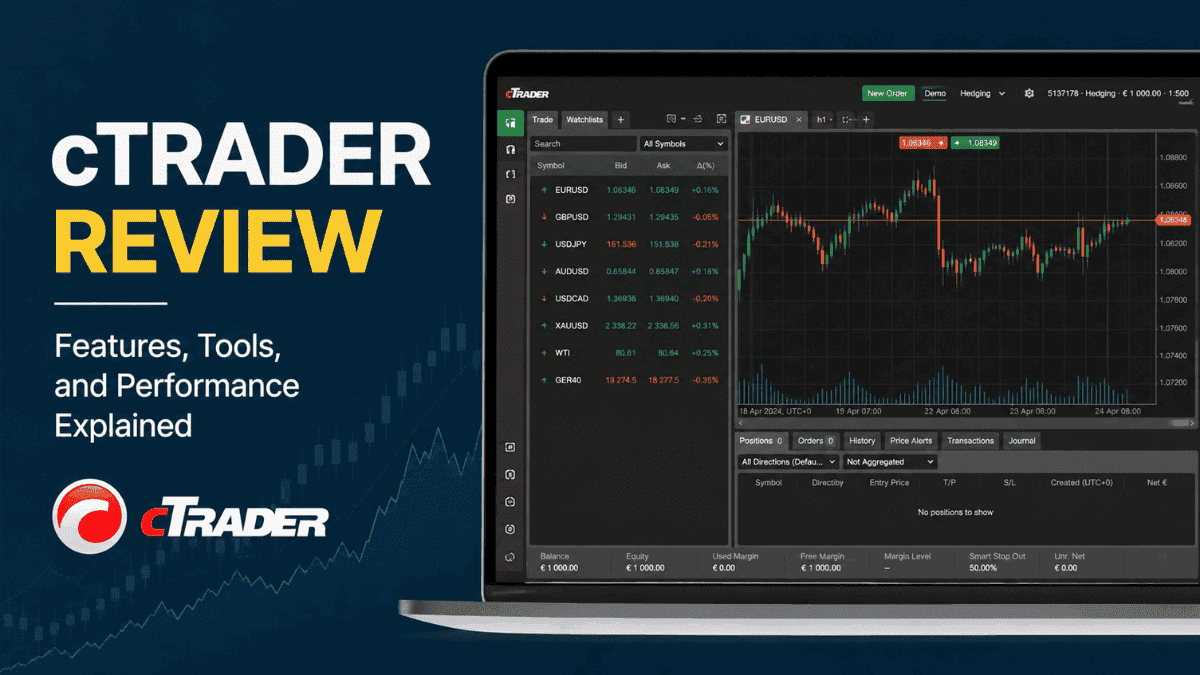
Trading platforms can make or break your experience as a forex or CFD trader. A broker may offer tight spreads and strong regulation, but if the platform feels outdated, slow, or cluttered, your execution and decision-making can suffer over time. That is exactly why cTrader has built such a loyal following among active traders.
Originally developed by Spotware Systems, cTrader was designed to compete directly with platforms like MetaTrader 4 and MetaTrader 5. Instead of copying the old-school layout traders had grown used to, cTrader focused on cleaner design, faster execution, transparent pricing, and institutional-style tools. Over the years, it has evolved into one of the most respected trading platforms in the forex and CFD industry.

This cTrader review takes a deep look at the platform’s features, usability, charting tools, copy trading capabilities, automation support, pricing model, and overall trading experience. Whether you are a beginner looking for a modern interface or an advanced trader searching for better execution tools, understanding how cTrader works can help you decide if it fits your trading style.
What is cTrader?
At its core, cTrader is a multi-asset trading platform built primarily for forex and CFD trading. The platform supports desktop, web, and mobile trading while giving users access to advanced charting, depth of market data, algorithmic trading, and copy trading features.
Unlike some legacy platforms that feel heavily dependent on plugins, cTrader was developed with a more integrated ecosystem in mind. Many features that traders typically install separately on other platforms are already built directly into the software.
One of the platform’s strongest selling points is transparency. cTrader emphasizes direct market access-style execution, Level II pricing, and detailed trade analytics. This has made it especially popular among:
- Scalpers
- Day traders
- Algorithmic traders
- High-frequency traders
- Traders using ECN-style accounts
At the same time, the interface is clean enough for beginners to learn without feeling overwhelmed.
cTrader Review: Key Features Explained
The real strength of cTrader becomes obvious once you start exploring its trading tools. The platform combines modern design with professional-grade functionality in a way that feels intuitive rather than complicated.
Modern User Interface
One of the first things traders notice is how polished cTrader looks compared to older trading terminals. Menus are cleaner, chart management feels smoother, and navigation is far more intuitive.
The workspace is highly customizable. You can arrange multiple charts, detach windows across monitors, create watchlists, and save layouts depending on your trading strategy. If you trade several currency pairs simultaneously, this flexibility becomes extremely valuable.
Unlike older platforms where features sometimes feel buried inside menus, cTrader organizes tools logically. That reduces clutter and improves workflow efficiency.
Advanced Charting Tools
Charting is one of cTrader’s strongest areas. The platform includes dozens of built-in indicators, multiple chart types, and extensive drawing tools suitable for both technical analysts and price action traders.
You can access:
- Candlestick charts
- Renko charts
- Tick charts
- Range charts
- Heikin Ashi charts
The platform also supports multiple timeframes, ranging from tick data to monthly charts.
What separates cTrader from many competitors is how smooth the chart interaction feels. Zooming, scrolling, and switching timeframes happen almost instantly. That responsiveness matters when markets move quickly.
For traders who rely heavily on technical analysis, cTrader delivers a professional-grade environment without requiring third-party add-ons.
Order Execution and Trading Experience
Execution quality matters more than flashy visuals. Even the best charting tools become meaningless if trades execute poorly during volatile market conditions.
Fast Trade Execution
cTrader was built with execution speed as a major priority. The platform supports one-click trading and quick order modification directly from the chart.
This is particularly useful for scalpers and intraday traders who need fast entries and exits. During high-impact news events or rapid market movements, every second matters.
Many brokers offering cTrader provide ECN or Raw Spread accounts, which means traders often get tighter spreads paired with commission-based pricing.
Depth of Market (DOM)
Depth of Market, often shortened to DOM, shows available liquidity levels at different prices. This feature gives traders a more institutional-style view of the market.
There are several DOM modes inside cTrader, including:
- Standard DOM
- Price DOM
- VWAP DOM
For beginners, this may sound technical at first. In practical terms, it helps traders understand liquidity distribution and market pressure more clearly.
Short-term traders often use DOM information to identify potential areas of support, resistance, or liquidity imbalance.
Advanced Order Types
cTrader supports more sophisticated order management than many basic trading platforms.
Traders can use:
- Market orders
- Limit orders
- Stop orders
- Stop-limit orders
- Market range orders
- Trailing stops
The platform also allows partial closes and advanced protection settings directly during order placement.
That flexibility gives traders more precise control over risk management and trade execution.
cTrader Copy Trading
Copy trading has become extremely popular among beginner traders who want exposure to the markets without actively managing every trade themselves.
cTrader includes a built-in social trading ecosystem called cTrader Copy.
How cTrader Copy Works
The concept is straightforward. Strategy providers share their trading performance publicly, and investors can allocate funds to automatically copy those trades.
The platform displays detailed analytics, including:
- Historical returns
- Drawdown levels
- Risk scores
- Equity curves
- Number of followers
This transparency helps users evaluate strategies more objectively instead of relying purely on marketing claims.
Unlike some copy trading systems that feel disconnected from the main platform, cTrader Copy is fully integrated into the trading environment.
Is cTrader Copy Good for Beginners?
For beginners, cTrader Copy can provide educational value alongside potential investment opportunities. Watching how experienced traders manage entries, exits, and risk can accelerate the learning process.
Still, copy trading is not a guaranteed shortcut to profitability. Some traders focus too heavily on high returns while ignoring drawdowns or inconsistent risk management.
A more balanced approach involves studying both profitability and stability before allocating funds to any strategy provider.
Algorithmic Trading and Automation
Automation is another area where cTrader performs extremely well.
cTrader Automate
The platform’s automation environment is known as cTrader Automate, previously called cAlgo.
It allows traders to create:
- Custom indicators
- Trading robots
- Automated strategies
- Backtesting systems
cTrader uses the C# programming language, which many developers prefer because of its flexibility and performance.
Compared to MQL4 or MQL5 used by MetaTrader platforms, some programmers find C# easier to work with for advanced strategy development.
Backtesting and Optimization
Backtesting helps traders test strategies using historical market data before risking real money.
cTrader supports:
- Visual backtesting
- Tick-data simulations
- Strategy optimization
- Multi-parameter testing
This is especially useful for traders developing systematic or quantitative trading models.
The testing environment is relatively fast and visually cleaner than many competing platforms.
cTrader Mobile App Review
Mobile trading has become essential for modern traders. Even traders who primarily use desktop platforms often monitor positions from their phones.
The cTrader mobile app is available for both Android and iOS devices.
Mobile Trading Experience
The mobile interface maintains the clean design philosophy found on the desktop version.

Charts remain responsive, and navigation feels intuitive even on smaller screens. Traders can manage positions, analyze charts, place orders, and monitor market activity without major limitations.
Many mobile trading apps sacrifice charting quality for simplicity. cTrader manages to balance both effectively.
Synchronization Across Devices
A useful feature is cloud synchronization. Watchlists, templates, and settings can sync across desktop, web, and mobile versions.
This creates a smoother trading workflow if you frequently switch devices throughout the day.
cTrader vs MetaTrader 4
The cTrader vs MT4 debate continues to divide traders because both platforms appeal to different audiences.
Why Some Traders Prefer cTrader
Many traders consider cTrader more modern and user-friendly than MT4.
Advantages often include:
- Cleaner interface
- Better charting experience
- Faster execution tools
- Built-in depth of market
- Integrated copy trading
- More advanced order management
The platform also feels less dependent on third-party plugins.
Why MT4 Still Dominates
Despite its age, MT4 remains extremely popular because of its enormous ecosystem.
Traders still choose MT4 for:
- Massive library of indicators
- Thousands of Expert Advisors
- Large trading community
- Broad broker support
- Familiarity
If you rely heavily on custom MT4 tools or purchased Expert Advisors, switching platforms may not feel practical.
cTrader vs MetaTrader 5
The comparison between cTrader and MT5 is more balanced because MT5 is significantly more advanced than MT4.
Where cTrader Stands Out
cTrader often wins in terms of user experience and interface design. Many traders find the workflow smoother and less cluttered.
Its execution transparency and depth of market tools are also highly regarded.
Where MT5 Has Advantages
MT5 offers broader asset support and stronger integration for exchange-traded instruments through some brokers.
It also has:
- More built-in indicators
- Economic calendar integration
- Expanded order functionality
- Multi-threaded strategy testing
For traders deeply invested in the MetaTrader ecosystem, MT5 can still be a strong choice.
Which Brokers Offer cTrader?
Several major forex and CFD brokers support cTrader accounts.
Popular examples include:
- Pepperstone
- IC Markets
- FxPro
- Fusion Markets
- Skilling
Broker conditions still matter more than the platform itself. Even the best software cannot compensate for poor execution quality, weak regulation, or hidden fees.
When choosing a cTrader broker, pay close attention to:
- Regulation
- Spread structure
- Commission costs
- Execution quality
- Available instruments
- Deposit and withdrawal policies
cTrader Pros and Cons
No trading platform is perfect. Understanding both strengths and limitations helps create realistic expectations.
Pros
- Modern and intuitive interface
- Excellent charting tools
- Fast execution speeds
- Advanced order management
- Integrated copy trading
- Strong automation support
- Cloud synchronization across devices
- Institutional-style trading features
Cons
- Smaller ecosystem than MetaTrader
- Fewer custom indicators and bots are available online
- Limited broker availability compared to MT4
- Some advanced features may overwhelm complete beginners initially
Is cTrader Good for Beginners?
Beginners often assume advanced trading platforms are automatically difficult to use. cTrader challenges that assumption.
The interface is surprisingly beginner-friendly while still offering professional functionality underneath.
New traders typically appreciate:
- Clean layout
- Easy navigation
- Simple chart management
- Built-in educational structure
- Integrated risk management tools
That said, beginners should avoid focusing only on platform features. A strong platform cannot replace proper trading education, discipline, and risk management.
Learning how to control position size, stop losses, and emotional decision-making matters far more than selecting the “perfect” trading software.
Is cTrader Safe?
The platform itself is widely considered secure and reputable within the trading industry.
Security features include:
- Encrypted connections
- Secure cloud infrastructure
- Two-factor authentication support
- Session management tools
Still, platform safety also depends heavily on the broker you choose. A trustworthy platform connected to an unregulated broker still creates significant risk.
Always prioritize brokers regulated by respected authorities whenever possible.
Final Verdict
cTrader has earned its reputation as one of the best modern trading platforms for forex and CFD traders. It combines professional-level tools with a cleaner and more intuitive experience than many legacy platforms.
The platform shines in areas that matter most to active traders: execution speed, charting quality, order management, transparency, and workflow efficiency. Copy trading and automation features add even more flexibility for traders with different goals and experience levels.
It may not completely replace the massive ecosystem surrounding MetaTrader platforms anytime soon. MT4 and MT5 still dominate in terms of broker support and third-party tools. Even so, many traders who try cTrader end up preferring its smoother trading experience.
If you value modern design, advanced execution tools, and institutional-style features without unnecessary complexity, cTrader is absolutely worth considering.
Frequently Asked Questions About cTrader
Is cTrader better than MT4?
Many traders believe cTrader offers a cleaner interface, better charting, and improved execution tools compared to MT4. However, MT4 still has a larger ecosystem of custom indicators and Expert Advisors.
Is cTrader free to use?
Yes, cTrader is generally free to use through supported brokers. Traders may still pay spreads, commissions, or overnight financing charges depending on their broker account type.
Can you use automated trading on cTrader?
Yes, cTrader supports algorithmic trading through cTrader Automate, which allows users to build trading robots and custom indicators using C#.
Is cTrader good for scalping?
Yes, cTrader is highly popular among scalpers because of its fast execution speeds, depth of market tools, and advanced order management capabilities.
Which brokers support cTrader?
Several major brokers support cTrader, including Pepperstone, IC Markets, and FxPro.
Is cTrader suitable for beginners?
Yes, cTrader is beginner-friendly thanks to its clean interface and intuitive navigation, although beginners should still focus heavily on risk management and trading education.
Trade on the Go. Anywhere, Anytime
If you’re ready to apply what you’ve learned, consider trading with a globally recognized forex and CFD broker like XM .
The platform offers competitive spreads, fast execution, and access to advanced trading tools, including real-time charts and flexible account types, making it suitable for both beginners and experienced traders. Open a trading account for free and start trading today and join millions of traders and investors on the global forex market.
Trading involves risk. Ensure you understand how the markets work before investing.

Vincent Nyagaka is the founder of Chweya, where he breaks down complex financial topics into simple insights. A trader since 2015, he uses his market experience to help readers better understand investing, trading, and personal finance.