MetaTrader 4 has remained one of the most widely used forex trading platforms for nearly two decades, even as newer competitors continue entering the market. While many trading platforms promise advanced tools and modern interfaces, MT4 continues attracting millions of traders because of its reliability, simplicity, and strong automation capabilities.
Whether you are a beginner learning how forex trading works or an experienced trader running automated strategies, chances are you have already heard about MetaTrader 4. The platform is supported by hundreds of brokers worldwide and is still considered the industry standard for retail forex trading.

This MetaTrader 4 Review explores everything you need to know before using the platform. You will learn about its features, charting tools, Expert Advisors (EAs), mobile trading experience, pros and cons, security, and how it compares to newer alternatives like MetaTrader 5.
By the end of this review, you should have a clear understanding of whether MetaTrader 4 still deserves a place in your trading setup today.
What Is MetaTrader 4?
MetaTrader 4 Review articles often start with one big question: why does a platform released in 2005 still dominate the forex trading world? The answer comes down to reliability, simplicity, and flexibility. Even after nearly two decades, MetaTrader 4 — commonly called MT4 — remains one of the most trusted trading platforms for forex traders globally.
Developed by MetaQuotes Software, MT4 was designed primarily for forex trading, though many brokers now use it for commodities, indices, and cryptocurrencies as well. The platform became popular because it combines advanced charting tools with an interface that beginners can learn fairly quickly.
Unlike many modern trading platforms that overload users with unnecessary features, MT4 focuses on speed and functionality. Traders can analyze charts, place trades, run automated strategies, and monitor markets from one dashboard without feeling overwhelmed.
MetaTrader 4 Review Key Features
One reason MT4 remains relevant is the balance between simplicity and professional-grade functionality. Whether you are a beginner learning candlestick patterns or an experienced trader running automated systems, the platform has tools that support both styles.
Advanced Charting Tools
At the heart of MT4 is its charting system. Traders can open multiple charts simultaneously and customize them with indicators, templates, and drawing tools.
MT4 supports:
- Multiple chart timeframes
- Technical indicators
- Trend lines and Fibonacci tools
- Candlestick, line, and bar charts
- Custom chart templates
The platform includes many built-in indicators such as RSI, MACD, Bollinger Bands, and Moving Averages. You can also install custom indicators developed by third-party programmers.
For technical traders, this flexibility is a major advantage. You are not locked into a basic default setup. Instead, you can create a workspace tailored to your trading strategy.
One-Click Trading
Execution speed matters in forex trading, especially for scalpers and day traders. MT4 includes one-click trading functionality that allows traders to enter and exit positions instantly from the chart window.
This feature reduces delays and helps traders react quickly during fast-moving market conditions. It may sound simple, but when volatility spikes during major economic news releases, execution speed can make a noticeable difference.
Expert Advisors (EAs)
One of MT4’s biggest strengths is support for Expert Advisors, commonly called EAs. These are automated trading systems that execute trades based on pre-programmed rules.
For example, an EA can:
- Open trades when indicators align
- Close positions automatically
- Manage stop losses and take profits
- Monitor multiple currency pairs simultaneously
Automated trading became one of the main reasons MT4 exploded in popularity. Traders could backtest strategies and automate repetitive tasks without sitting in front of charts all day.
Many commercial forex robots and custom trading bots are still built specifically for MT4 because of its massive user base.
User Interface and Trading Experience
A trading platform can have powerful tools, but if navigation feels confusing, most traders will avoid it. MT4 succeeds because its interface is practical and familiar.
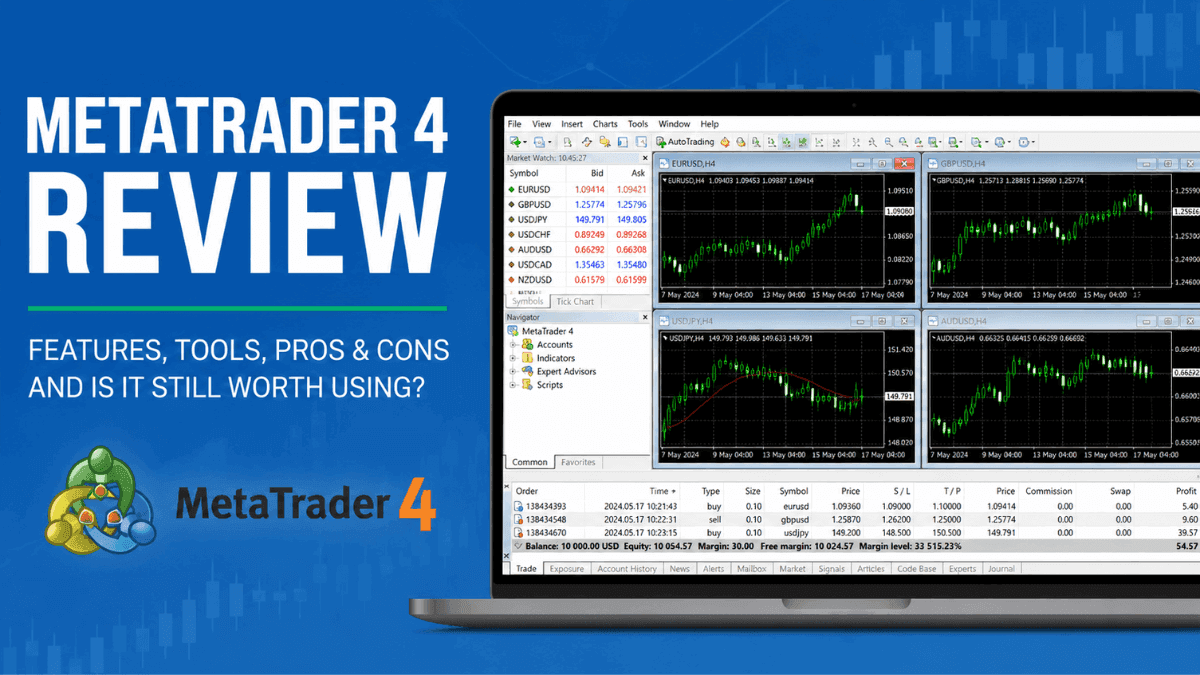
The layout includes:
- Market Watch window for currency pairs
- Navigator panel for indicators and accounts
- Chart windows
- Terminal section for trades and account history
At first glance, the interface may look slightly outdated compared to newer platforms. Still, experienced traders often prefer MT4 because everything is accessible without excessive menus or animations.
The platform is lightweight and performs well even on lower-end computers. That matters more than flashy design when you are actively trading.
MetaTrader 4 Mobile App Review
Mobile trading has become essential for modern traders, and MT4 performs surprisingly well on smartphones and tablets.
The MT4 mobile app allows users to:
- Open and close trades
- Monitor charts
- Use technical indicators
- Receive trading alerts
- Manage account history
The app is available for both Android and iOS devices. While chart analysis feels more comfortable on a desktop, the mobile version works well for monitoring positions while away from your computer.
Navigation is clean, and trade execution remains relatively fast. For traders who travel frequently or monitor positions throughout the day, the mobile app adds significant convenience.
MetaTrader 4 for Beginners
Many beginner traders choose MT4 because most forex education content online is built around it. Tutorials, indicators, strategies, and trading communities commonly use MT4 examples.
That widespread adoption creates a learning advantage. If you encounter a problem, there are thousands of guides and videos available explaining how to fix it.
Is MT4 Easy to Learn?
MT4 has a learning curve, but it is not overly difficult. Most beginners become comfortable with the basics within a few days.
You can quickly learn how to:
- Open trades
- Add indicators
- Change chart timeframes
- Set stop losses
- Use templates
The more advanced features, such as Expert Advisors and custom scripts, take longer to master. Still, beginners can trade effectively without diving into coding or automation immediately.
Automated Trading and Strategy Testing
Automation is where MT4 still stands out from many competitors.
The platform includes a built-in Strategy Tester that allows traders to backtest automated systems using historical market data. This helps traders evaluate whether a strategy performed well in past conditions before risking real money.
For example, a trader can test:
- Win rate
- Drawdown
- Profit factor
- Trade frequency
- Historical performance
Backtesting does not guarantee future profits, but it helps traders identify weaknesses in a strategy before going live.
MT4 uses the MQL4 programming language for automation. While beginners may not write code themselves, many developers offer custom indicators and EAs for purchase or free download.
Broker Compatibility
A major reason MT4 remains dominant is broker support. Hundreds of forex brokers still offer MetaTrader 4 because traders continue demanding it.
Popular broker categories supporting MT4 include:
- Forex brokers
- CFD brokers
- Commodity brokers
- Crypto CFD brokers
This wide compatibility makes switching brokers easier. Traders do not need to learn a completely new platform every time they open an account elsewhere.
Many brokers also provide custom MT4 plugins, enhanced indicators, VPS hosting, and copy trading integrations.
Security and Reliability
Trust matters when dealing with financial markets. MT4 has earned a reputation for stability over many years of use.
The platform uses encrypted data transmission between traders and brokers, helping secure account information and trade execution.
It is also known for:
- Stable execution
- Minimal crashes
- Low hardware requirements
- Reliable order management
No trading platform is completely immune to technical issues, especially during extreme market volatility. Still, MT4 has built a strong reputation for consistency compared to many newer alternatives.
Pros and Cons of MetaTrader 4
Every platform has strengths and weaknesses. MT4 is no exception.
Pros
- Beginner-friendly interface
- Excellent charting tools
- Strong broker support
- Large library of indicators and EAs
- Fast execution
- Lightweight software
- Reliable mobile app
- Ideal for forex trading
Cons
- Interface feels outdated
- Limited built-in asset coverage compared to newer platforms
- Fewer advanced order types than some competitors
- MQL4 is older than newer scripting languages
- Less suitable for advanced stock trading
For pure forex trading, many traders still consider MT4 more than enough. If you need extensive multi-asset investing features, newer platforms may offer more flexibility.
MetaTrader 4 vs MetaTrader 5
Many traders compare MT4 with MetaTrader 5 (MT5). Although the names sound similar, the platforms differ in several ways.
MT4 focuses mainly on forex trading, while MT5 supports broader asset classes, including stocks and futures.
Key differences include:
| Feature | MT4 | MT5 |
|---|---|---|
| Primary Focus | Forex | Multi-asset |
| Programming Language | MQL4 | MQL5 |
| Order Types | Basic | More advanced |
| Economic Calendar | No | Yes |
| Strategy Tester | Single-threaded | Multi-threaded |
| Community Support | Massive | Growing |
Despite MT5 being technically newer, many forex traders still prefer MT4 because of familiarity and EA compatibility.
Who Should Use MetaTrader 4?
MT4 works best for traders who prioritize forex trading, technical analysis, and automation.
It is particularly suitable for:
- Beginner forex traders
- Scalpers
- Day traders
- Swing traders
- EA users
- Technical analysts
Long-term investors focused on stocks or portfolio investing may find other platforms more suitable. MT4 was built for active trading rather than traditional investing.
Final Verdict
MetaTrader 4 remains one of the best forex trading platforms ever created. That may sound bold for software released nearly 20 years ago, but the platform continues proving its value through reliability, flexibility, and massive community support.
Its clean interface, strong charting tools, Expert Advisor ecosystem, and broad broker compatibility make it an excellent choice for both beginners and experienced traders. While the design may look dated compared to modern platforms, functionality matters far more than appearance when real money is on the line.
For traders focused primarily on forex and CFD trading, MT4 still delivers nearly everything needed to analyze markets and execute trades efficiently. Unless you specifically require advanced multi-asset investing tools, there is a good chance MT4 remains more than capable of handling your trading needs.
Frequently Asked Questions About MetaTrader 4
Yes. Most brokers offer MetaTrader 4 for free when you open a trading account. You can also use demo accounts without depositing real money.
Yes. MT4 is considered beginner-friendly because of its simple interface, large educational community, and wide availability of tutorials.
Some brokers allow cryptocurrency CFD trading through MT4. Availability depends on the broker you choose.
Yes. MT4 supports Expert Advisors (EAs), which allow traders to automate trading strategies and execute trades automatically.
MT4 is available on Windows, macOS, Android, iPhone, and web browsers through broker-supported web terminals.
That depends on your trading style. MT4 is often preferred for forex trading and EA compatibility, while MT5 offers broader market access and additional features.
Trade on the Go. Anywhere, Anytime
If you’re ready to apply what you’ve learned, consider trading with a globally recognized forex and CFD broker like XM .
The platform offers competitive spreads, fast execution, and access to advanced trading tools, including real-time charts and flexible account types, making it suitable for both beginners and experienced traders. Open a trading account for free and start trading today and join millions of traders and investors on the global forex market.
Trading involves risk. Ensure you understand how the markets work before investing.

Vincent Nyagaka is the founder of Chweya, where he breaks down complex financial topics into simple insights. A trader since 2015, he uses his market experience to help readers better understand investing, trading, and personal finance.