A Virtual Private Server (VPS) gives you dedicated resources inside a shared physical server, offering more power, flexibility, and control than traditional shared hosting. Whether you run a website, trading platform, online store, or business application, a VPS can dramatically improve speed, stability, and security when configured correctly.
Many people first hear about VPS hosting when their website becomes slow, their traffic grows, or they want to run software that shared hosting cannot support. Traders also use VPS solutions to keep platforms like MetaTrader running 24/7 with lower latency and fewer interruptions.
Click Here To Join our Telegram Community
This guide explains what a Virtual Private Server is, how it works, who should use it, its advantages and disadvantages, and how to choose the best VPS for your needs.
What Is a Virtual Private Server (VPS)?
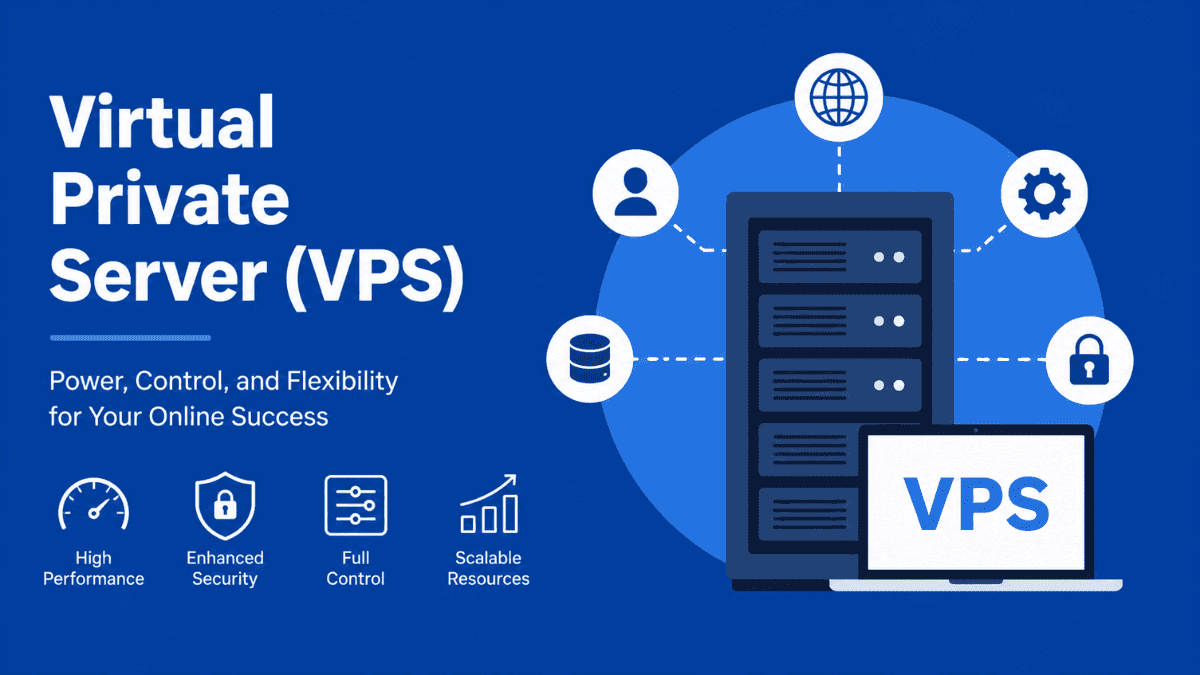
A Virtual Private Server is a virtualized server environment created inside a physical server using virtualization technology. Instead of sharing all resources equally with hundreds of users like traditional shared hosting, each VPS gets allocated resources such as CPU power, RAM, storage, and bandwidth.
Think of it like living in an apartment building. The building itself is the physical server, while each apartment is a VPS. You have your own space, your own utilities, and your own control, even though multiple users exist within the same building.
A VPS typically includes:
- Dedicated RAM allocation
- Assigned CPU cores
- Isolated operating system
- Root or administrator access
- Independent software installation
- Custom server configuration
This balance between affordability and performance is what makes VPS hosting extremely popular.
How VPS Hosting Works
To understand VPS hosting properly, you first need to understand virtualization. A powerful physical server is divided into multiple virtual environments using software called a hypervisor.
Each virtual server behaves almost like an independent machine. Users can install applications, reboot their VPS, customize settings, and manage resources without directly affecting other users on the same hardware.
Here’s the simplified process:
- A hosting provider sets up a powerful physical server
- Virtualization software divides the server into smaller virtual servers
- Each VPS receives dedicated resource allocations
- Users manage their VPS independently
This setup creates stronger isolation compared to shared hosting while remaining cheaper than renting an entire dedicated server.
VPS vs Shared Hosting
Choosing between VPS and shared hosting depends heavily on your traffic, technical needs, and performance expectations.
Shared Hosting
Shared hosting places many websites in the same environment with minimal separation. It is cheap and beginner-friendly, but performance can suffer if neighboring websites consume excessive resources.
Shared hosting is ideal for:
- Small blogs
- New websites
- Low-traffic projects
- Basic business pages
The downside is limited control and weaker performance consistency.
VPS Hosting
VPS hosting offers dedicated resources and much more control. Your environment is isolated, meaning another user’s traffic spikes are less likely to affect your performance.
A VPS is better for:
- Growing websites
- Forex trading platforms
- E-commerce stores
- Web applications
- Gaming servers
- Businesses requiring stronger security
You also gain root access, which allows advanced configuration and software installation.
VPS vs Dedicated Server
A dedicated server means renting an entire physical machine exclusively for yourself. While this provides maximum performance and control, it also comes with significantly higher costs.
A VPS is often the smarter choice for medium-sized projects because it delivers strong performance at a fraction of the price.
When a VPS Makes More Sense
A VPS is usually enough when you:
- Run medium-traffic websites
- Need stable performance
- Want affordable scalability
- Require software customization
- Need better uptime than shared hosting
When Dedicated Hosting Is Better
Dedicated servers become worthwhile when you:
- Operate enterprise-level applications
- Process massive traffic volumes
- Need extreme computing power
- Require advanced compliance standards
- Run highly resource-intensive workloads
For most users, a properly configured VPS provides more than enough performance.
Types of VPS Hosting
Not all VPS solutions are the same. Hosting providers usually offer different management levels and infrastructure options.
Managed VPS Hosting
Managed VPS hosting means the provider handles technical maintenance tasks such as:
- Server updates
- Security patches
- Monitoring
- Backups
- Troubleshooting
This option works well for beginners or businesses that do not have server administration experience.
The tradeoff is cost. Managed VPS plans are more expensive because you are paying for ongoing support and maintenance.
Unmanaged VPS Hosting
With unmanaged VPS hosting, you control everything yourself. The hosting company provides the server infrastructure, but setup and maintenance become your responsibility.
This option suits developers, advanced users, and system administrators comfortable with Linux or Windows server management.
Unmanaged VPS hosting is cheaper, but mistakes in configuration can lead to security risks or downtime.
Linux VPS vs Windows VPS
The operating system matters because it affects compatibility, cost, and performance.
Linux VPS
Linux VPS hosting is the most common option because it is lightweight, stable, and cost-effective. Popular Linux distributions include:
- Ubuntu
- CentOS
- Debian
- AlmaLinux
Linux VPS hosting works especially well for websites, WordPress, applications, and trading servers.
Windows VPS
Windows VPS hosting is useful when you need software specifically designed for Windows environments.
Examples include:
- Microsoft SQL Server
- ASP.NET applications
- Certain trading platforms
- Remote Desktop environments
Windows licenses increase costs, which is why Windows VPS plans are generally more expensive.
Why Businesses Use Virtual Private Servers
Businesses upgrade to VPS hosting when shared hosting becomes limiting. Performance issues, security concerns, and scalability challenges often trigger the move.
A VPS gives businesses more control over:
- Website speed
- Resource usage
- Application performance
- Security configurations
- Custom software environments
For online stores, stable performance directly impacts sales. Slow pages reduce conversions and damage user trust.
For SaaS businesses and developers, VPS hosting enables flexible deployment environments and custom server stacks.
VPS for Forex Trading
Forex traders frequently use VPS hosting to keep trading platforms online 24 hours a day. This is especially common among traders using Expert Advisors (EAs), trading bots, or automated systems on MetaTrader 4 and MetaTrader 5.
A trading VPS helps reduce:
- Internet interruptions
- Power outages
- Platform disconnections
- Execution delays
Low-latency VPS servers positioned near broker data centers can also improve order execution speed.
For example, if your home internet disconnects during a volatile market move, your VPS continues running remotely. That stability can be critical for automated trading strategies.
Benefits of Using a VPS
A Virtual Private Server offers several major advantages over cheaper hosting environments.
Better Performance
Dedicated resource allocation improves consistency and responsiveness. Your applications no longer compete heavily with hundreds of neighboring websites.
This leads to:
- Faster page loading
- Better uptime
- Improved application stability
- Smoother traffic handling
Performance becomes even more important for websites targeting SEO rankings and user retention.
Greater Control
Root access gives you complete administrative control over the server environment.
You can:
- Install custom software
- Modify server settings
- Configure firewalls
- Optimize performance
- Deploy specialized applications
This flexibility is one of the biggest reasons developers prefer VPS hosting.
Improved Security
VPS isolation creates stronger security boundaries compared to shared hosting.
While no hosting solution is perfectly secure, a VPS reduces risks associated with vulnerable neighboring websites. You also gain the ability to implement your own security policies and monitoring tools.
Scalability
As your website or application grows, VPS resources can often be upgraded quickly.
You can increase:
- RAM
- CPU cores
- Storage
- Bandwidth
This scalability allows businesses to grow without migrating immediately to expensive dedicated infrastructure.
Cost Efficiency
A VPS offers an excellent middle ground between affordability and performance.
Shared hosting may become unreliable under growth, while dedicated servers may exceed your budget. VPS hosting bridges that gap effectively.
Disadvantages of VPS Hosting
Despite its advantages, VPS hosting is not perfect for every situation.
Higher Costs Than Shared Hosting
A VPS costs more because you receive dedicated resources and stronger isolation.
While entry-level VPS plans are affordable, advanced plans with premium hardware and management services can become expensive over time.
Technical Complexity
Unmanaged VPS hosting requires technical knowledge.
Tasks such as:
- Server hardening
- Software updates
- Firewall configuration
- Backup management
- Performance tuning
It can overwhelm beginners without prior experience.
Managed VPS hosting solves this problem, but increases monthly costs.
Resource Limits Still Exist
Although VPS resources are dedicated, they are not unlimited.
Heavy workloads can still exceed available CPU or RAM allocations, especially on lower-tier plans. Resource-intensive applications may eventually require dedicated infrastructure.
How to Choose the Best VPS Hosting
Selecting the right VPS depends on your workload, budget, and technical expertise.
Evaluate Performance Specifications
Pay attention to:
- CPU allocation
- RAM size
- NVMe or SSD storage
- Bandwidth limits
- Network speed
Fast NVMe storage and modern processors noticeably improve performance.
Consider Server Location
Choose a server location close to your target audience or broker infrastructure.
For example:
- Websites benefit from servers near visitors
- Trading VPS solutions benefit from proximity to broker data centers
Lower latency improves responsiveness and user experience.
Check Uptime Guarantees
Reliable hosting providers usually offer uptime guarantees of 99.9% or higher.
Consistent uptime matters because downtime affects:
- SEO rankings
- Revenue
- Customer trust
- Trading execution
Review Support Quality
Technical support quality becomes extremely important during emergencies.
Before purchasing, evaluate:
- Live chat availability
- Response speed
- Documentation quality
- Knowledge base depth
Poor support can turn small technical issues into major problems.
Understand Scalability Options
Growth matters. Make sure the provider allows seamless resource upgrades without major migration headaches.
Scalable infrastructure prevents unnecessary downtime during traffic spikes or business expansion.
Common VPS Use Cases
A VPS is flexible enough to support many different workloads.
Popular use cases include:
- Web hosting
- Forex trading platforms
- Game servers
- Remote desktop environments
- Application hosting
- VPN servers
- Email hosting
- Database management
- Development environments
That flexibility is one reason VPS hosting remains popular among businesses and individual users alike.
VPS Security Best Practices
A VPS gives you more control, but security also becomes your responsibility.
Strong VPS security starts with:
- Using strong passwords
- Enabling firewalls
- Disabling unused services
- Installing security updates promptly
- Setting up automated backups
- Using SSH keys instead of passwords
- Monitoring server activity
Ignoring security maintenance can expose your server to attacks, malware, or data breaches.
How Much Does VPS Hosting Cost?
VPS pricing varies widely depending on specifications and management level.
Typical ranges include:
- Entry-level unmanaged VPS: $5–$20/month
- Mid-range managed VPS: $30–$100/month
- High-performance enterprise VPS: $100+/month
Pricing is influenced by:
- Hardware quality
- Management services
- Operating system
- Data center location
- Backup solutions
- Support quality
Cheapest is not always best. Stability, uptime, and support often matter more than saving a few dollars monthly.
Is VPS Hosting Worth It?
For many users, the answer is yes.
A Virtual Private Server becomes worthwhile when your website, application, or trading platform outgrows shared hosting limitations. You gain better speed, stronger security, more customization, and improved reliability without paying dedicated server prices.
The key is choosing the right balance between cost, performance, and management level.
If you need simple hosting for a tiny website, shared hosting may still be enough. But if performance, uptime, flexibility, or scalability matter to you, VPS hosting is often the smarter long-term investment.
Final Thoughts
A Virtual Private Server sits in the sweet spot between affordability and performance. It gives users dedicated resources, greater control, and scalable infrastructure without the high cost of dedicated hardware.
Whether you run a growing website, an online business, or automated trading systems, a VPS can provide the stability and flexibility needed to operate professionally. The important part is choosing a reliable provider, understanding your technical requirements, and maintaining proper server security.
As your projects grow, a well-configured VPS can become one of the most valuable pieces of your online infrastructure.
FAQs About Virtual Private Server (VPS)
A VPS is commonly used for hosting websites, running applications, managing databases, operating trading bots, hosting game servers, and creating remote desktop environments.
Yes, VPS hosting usually offers better performance, stronger security, and greater control compared to shared hosting. However, it also costs more and may require technical knowledge.
Not always. Managed VPS hosting is designed for users who prefer the provider to handle technical maintenance. Unmanaged VPS hosting requires server administration knowledge.
Yes. Many Forex traders use VPS hosting to keep MetaTrader platforms online continuously and reduce connection interruptions or latency issues.
It depends on your workload. Small websites may only need 1–2 GB RAM, while trading platforms, applications, or busy websites may require 4 GB or more.
Yes. Because VPS hosting provides dedicated resources, websites often load faster and handle traffic more efficiently than on shared hosting.
Trade on the Go. Anywhere, Anytime
If you’re ready to apply what you’ve learned, consider trading with a globally recognized forex and CFD broker like XM .
The platform offers competitive spreads, fast execution, and access to advanced trading tools, including real-time charts and flexible account types, making it suitable for both beginners and experienced traders. Open a trading account for free and start trading today and join millions of traders and investors on the global forex market.
Trading involves risk. Ensure you understand how the markets work before investing.

Vincent Nyagaka is the founder of Chweya, where he breaks down complex financial topics into simple insights. A trader since 2015, he uses his market experience to help readers better understand investing, trading, and personal finance.